Find news in local meetings. Create video highlights.
Search across meetings, verify details in the source video, and turn newsworthy moments into highlights that strengthen your reporting and expand your reach.
Already have an account? Sign In
Not sure if your newsroom is already using SeeGov? Find out.
For Newsrooms
Cover more meetings with less effort.
- Find stories across local government meetings
- Verify details with searchable transcripts and source video
- Strengthen your reporting with video highlights
For Civic Creators
Turn key moments into social video.
- Discover short, high-impact moments worth sharing
- Add context and shape clips for your audience
- Share social videos that spark interest in local government
Save hours on local reporting.
Share video when you’re ready.
Review the meeting. Find the story.
Scan agenda items and moment notes, then check the transcript and source video.
Enlarge screenshot; zoom to read the details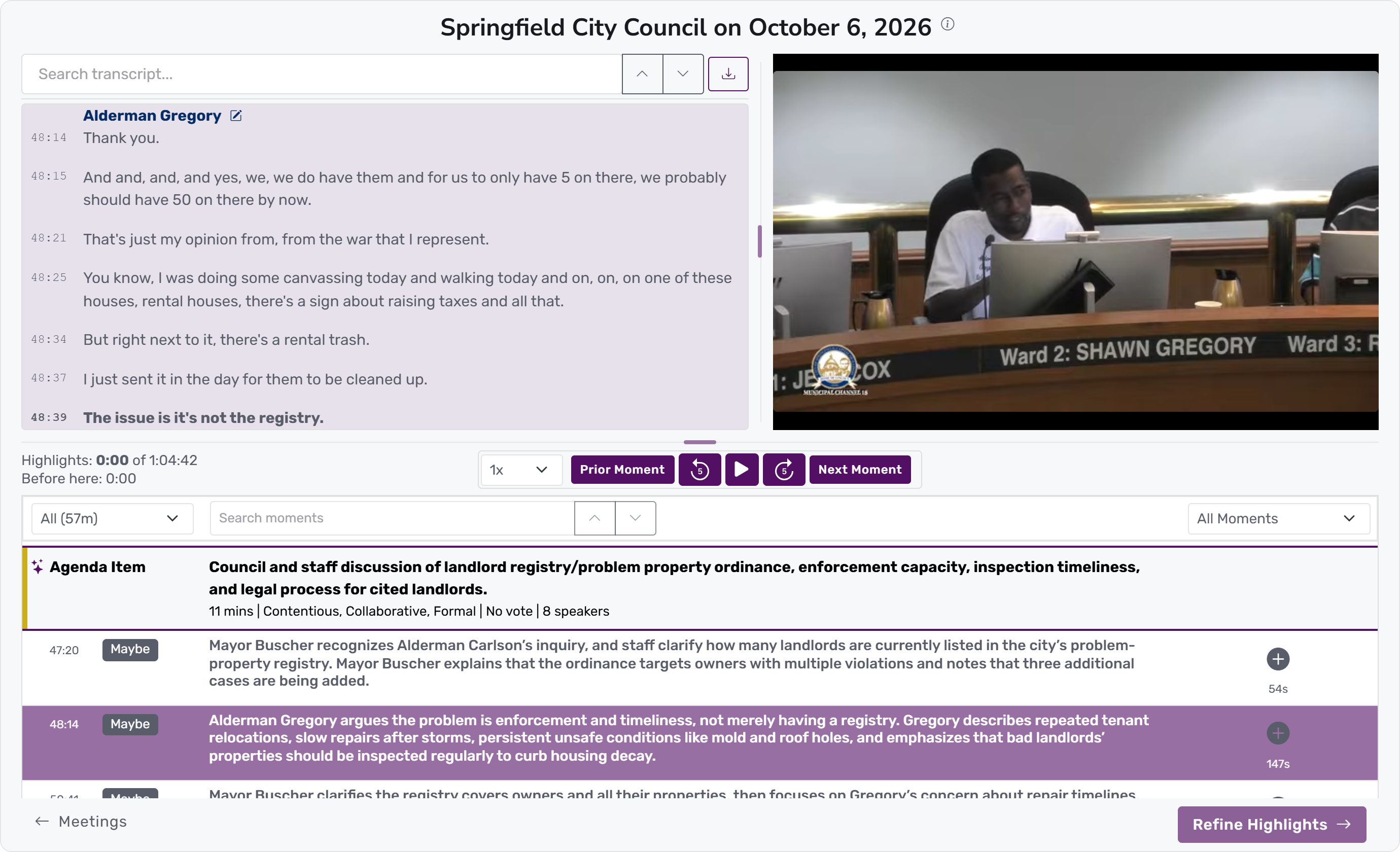
Follow Local Meetings
Stop hunting across websites and YouTube channels. SeeGov collects your local government meetings in one hub and alerts you the moment they're ready.
Find News
Search within and across meetings. Scan agenda items and moment-by-moment notes, find quotes in the transcript, and verify in the video.
Create Video Highlights
Choose the moments worth sharing and add context. Use AI suggestions or refine selections in the transcript to create shorts or broader meeting reports.
Share Everywhere
Download clips, embed them in your stories, or post directly to social channels to reach and engage your audience.
SeeGov monitors hundreds of government bodies. Sign up and request any governments you don’t find.
Start free. Expand your coverage.
View PlansTrusted by Newsrooms and Civic Creators
Our work is supported by Knight Foundation.





“It’s a no-brainer tool for newsrooms — especially small, understaffed, overworked ones like ours.”
Frequently Asked Questions
Find your next local story.
Need to see more before getting started? Explore Help
Shared civic infrastructure, built for democracy
One meeting, shared by many
SeeGov processes each meeting once, creating a transcript, speaker identification, agenda breakdown, and moment-by-moment annotations that every newsroom and creator covering it can use. Sharing those resources lowers the effective cost per user and helps trusted local voices reach more residents.
A mission to expand participation
SeeGov exists to expand participation in democracy. We enable news organizations and civic creators to reach residents who may not otherwise receive civic information, helping them understand local government issues and how to participate. As a nonprofit, we focus on advancing that mission, not generating returns for investors.
We also work with Civic Data Tech, Big Local News, MuckRock, and others strengthening civic information and local democracy.
